Gallery
Screens, labelled.
Select any image to enlarge it. Captures are real screenshots taken on sample or synthetic data. Dense desktop screens are easier to read when enlarged. Race Control images are renders from a development build using fictional drivers.
Real screen capture
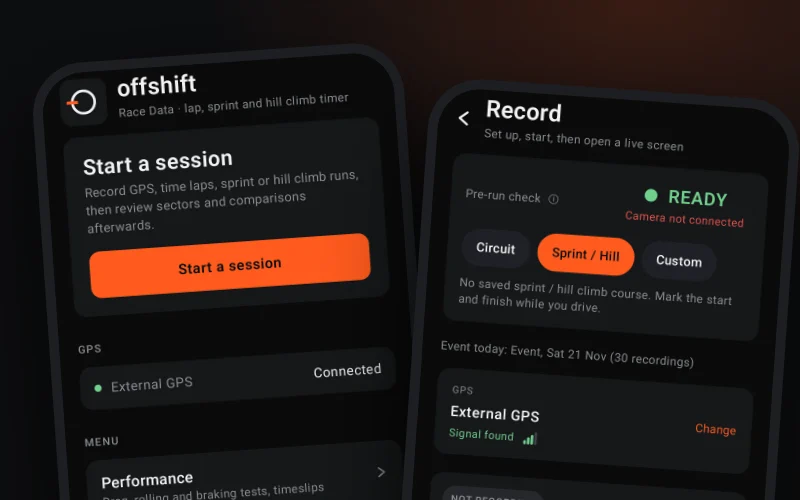
Offshift Telemetry. Home: Start a session sits at the top, with GPS status and the menu below. Captured on the developer’s phone.Real screen capture
Offshift Telemetry. A timeslip from demo data. The app marks it SIMULATED and says it is not a real run and is never ranked.Real screen capture
Offshift Telemetry. Performance mode: GPS source choice and readiness, captured from the phone.Real screen capture
Offshift Telemetry. Run history. Simulated runs are kept but tagged SIM and never ranked.Real screen capture
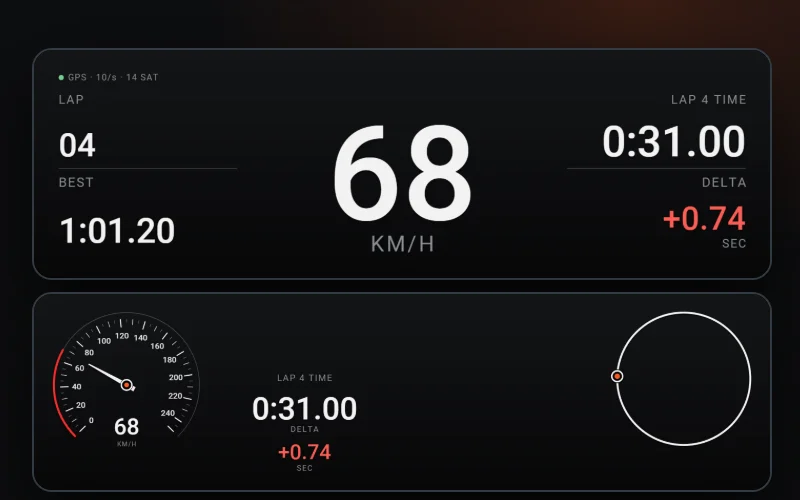
Offshift Telemetry. Live screen, lap and delta page, in demo mode. With no reference lap it says so instead of guessing.Real screen capture
Offshift Telemetry. Live screen, data page, in demo mode.Real screen capture
Offshift Telemetry. Live screen, simple page: speed, timer and delta. Demo mode.Real screen capture
Offshift Telemetry. Tracks: venue layouts with their outlines and lengths.Real screen capture
Offshift Telemetry. A venue layout. The outline comes from OpenStreetMap and says so on screen.Real screen capture
Offshift Telemetry. Choose what each slot on the live screens shows.Real screen capture
Offshift Telemetry. Performance tests, each measured on every run.Real screen capture
Offshift Telemetry. Start a session: pre-run check, session type and GPS source, then Start recording. The GPS receiver’s ID is hidden.Real screen capture
Offshift Telemetry. Place the finish on a recorded route, then fine-tune it a metre at a time.Real screen capture
Offshift Telemetry. The live screen before setting off: GPS rate and READY check up top, big speed in the middle.Real screen capture
Offshift Studio. The Overlay page, running on a synthetic test session. The banner in the app says SYNTHETIC TEST DATA.Real screen capture
Offshift Studio. Advanced sync with segments, on synthetic data.Real screen capture
Offshift Studio. The Runs page, on synthetic data.App render
Offshift Studio. Speed dial preset. Rendered by the app’s own overlay renderer from synthetic data, on a plain dark backdrop. The real export is transparent.App render
Offshift Studio. Phone Track preset. Rendered by the app’s own overlay renderer from synthetic data, on a plain dark backdrop. The real export is transparent.App render
Offshift Studio. Phone Lap and Delta preset. Rendered by the app’s own overlay renderer from synthetic data, on a plain dark backdrop. The real export is transparent.App render
Offshift Studio. Phone Data preset. Rendered by the app’s own overlay renderer from synthetic data, on a plain dark backdrop. The real export is transparent.App render
Offshift Studio. Recap card, rendered by the app from a synthetic four-lap session.Real screen capture
Offshift Studio. The Overlay page with timing widgets, on a synthetic test session.Real screen capture
Offshift Studio. The course wizard, where you place a start and finish on the recorded route. Synthetic data.Real screen capture
Offshift Studio. Results card export. GPS times are labelled unofficial. Synthetic data.Real screen capture
Race Control. Dashboard: the state of a round at a glance. Rendered by the app from fictional drivers and a test round (development build 0.6.0, dark theme).Real screen capture
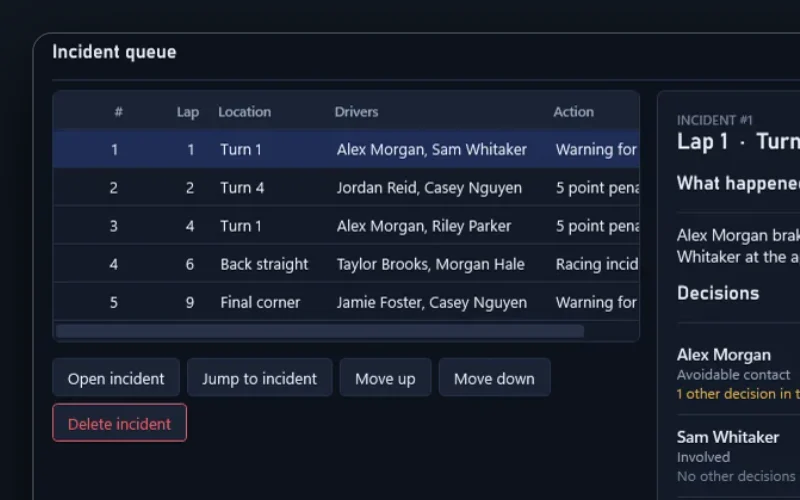
Race Control. Review desk: the incident queue with the selected incident and each driver’s decision. Rendered by the app from fictional drivers and a test round (development build 0.6.0, dark theme).Real screen capture
Race Control. Penalty ledger: approved decisions beside the ladder’s suggestion, and series totals. Rendered by the app from fictional drivers and a test round (development build 0.6.0, dark theme).Real screen capture
Race Control. Drivers, with merge tools for aliases and identities. Rendered by the app from fictional drivers and a test round (development build 0.6.0, dark theme).Real screen capture
Race Control. Championships: setup tools and a driver penalty summary. Rendered by the app from fictional drivers and a test round (development build 0.6.0, dark theme).Real screen capture
Race Control. Compact review: a narrow window for use beside the simulator. Rendered by the app from fictional drivers and a test round (development build 0.6.0, dark theme).Real screen capture
Race Control. Race Recap: published results, replay capture and a local recap writer. Rendered by the app from fictional drivers and a test round (development build 0.6.0, dark theme).Real screen capture
Race Control. Reports: export the round into the league’s Word template. Rendered by the app from fictional drivers and a test round (development build 0.6.0, dark theme).Real screen capture
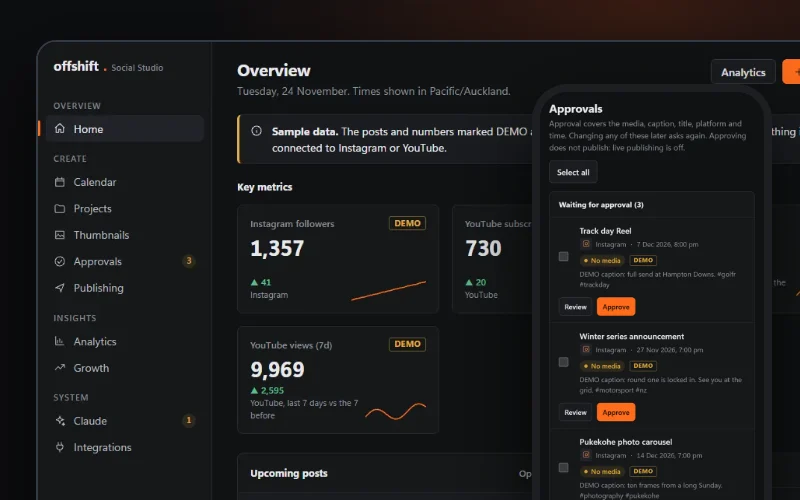
Offshift Social Studio. Overview on the app’s built-in sample data. Every tile is marked DEMO.Real screen capture
Offshift Social Studio. Month calendar on sample data.Real screen capture
Offshift Social Studio. Board view on sample data.Real screen capture
Offshift Social Studio. Approvals on sample data.Real screen capture
Offshift Social Studio. Thumbnail editor.Real screen capture
Offshift Social Studio. Video analysis, run on a generated test clip.Real screen capture
Offshift Social Studio. Analytics on sample data.Real screen capture
Offshift Social Studio. Manual publish pack.Real screen capture
Offshift Social Studio. Projects.Real screen capture
Offshift Social Studio. Publishing queue with live publishing off.Real screen capture
Offshift Social Studio. Overview on a phone. Sample data, phone layout.Real screen capture
Offshift Social Studio. Calendar list on a phone. Sample data, phone layout.Real screen capture
Offshift Social Studio. Approvals on a phone. Sample data, phone layout.Real screen capture
Offshift Social Studio. Publish pack on a phone. Sample data, phone layout.Real screen capture
Offshift Social Studio. Analytics on a phone. Sample data, phone layout.